Mini WhatsApp Bot: Meaning and How to Identify the Right Service
A mini whatsapp bot is a phrase people may use when searching for a WhatsApp bot, a smaller automation project or a particular bot name. However, the phrase alone does not identify a specific service or technical category. Erfan MD is the name of an independent WhatsApp bot project, with a website, pairing tool and bot that serve different purposes.
What People May Mean by “Mini WhatsApp Bot”
A Search Phrase Is Not Automatically a Product Category
People do not always use product names consistently when searching online. Someone searching for a mini WhatsApp bot may be looking for a lightweight chatbot, an automated messaging service, a bot they heard about from another person or a specific project using a similar name.
These possibilities are not interchangeable. A search phrase describes what someone is looking for; it does not prove that a service has a formal product category, an official brand name or a particular set of features.
The same distinction applies to searches such as “WhatsApp bot mini” and “WhatsApp Mini Bot.” Changing the word order does not establish that the searcher has found a particular developer or service.
Distinguish a Nickname, Bot Brand and Technical Description
Three things can look similar in search results but have different meanings:
- Nickname: An informal name someone uses when discussing a bot.
- Bot brand: The name a project or operator uses to identify its service.
- Technical description: A phrase describing what a bot does or how someone understands its features.
Before connecting an account, identify the operator behind the service rather than relying on a short search label. A matching phrase, logo or download title is not enough to establish that two services belong to the same project.
How to Identify the Service Being Described
Check the Exact Website and Operator Name
The website and operator name are more useful identification details than a generic search phrase. For Erfan MD, the website is erfan-md.site. It provides information and guides about the project.
Erfan MD is an independent WhatsApp bot project. It is not owned, operated, endorsed or certified by WhatsApp or Meta. The project should not be confused with unrelated services that use the words “Mini Bot,” “WhatsApp Bot” or similar names.
When identifying a service, check the website address, the name used throughout its information pages and whether its pairing instructions match the service you intended to use. You can read the Erfan MD explanation of how the service works to understand its separate components.
Avoid Confusing Erfan MD With Unrelated Mini Bot Projects
Search results can contain projects with similar names, copied descriptions or unrelated download pages. Do not assume that a third-party website, APK file or social media post belongs to Erfan MD simply because it uses the same search phrase.
Use the Erfan MD website as the starting point for its product information and pairing instructions. Avoid entering your WhatsApp number or sharing a pairing code on a website unless you have verified that it is the intended service.
A useful identification rule is simple: establish the website and operator first, understand the pairing process second, and only then decide whether the service matches what you were searching for.
How Erfan MD Describes Its Own Service
Erfan MD Has Three Separate Components
Erfan MD uses three distinct components. Understanding their roles helps prevent confusion when someone refers to the project as a mini WhatsApp bot.
| Component | Purpose | What it does |
|---|---|---|
| Website | Information and guidance | Provides information and guides about Erfan MD. |
| Pairing tool | Account connection | Lets the user choose a server and generate a pairing code. |
| Bot | WhatsApp interaction | Replies to commands inside WhatsApp. |
These components have different responsibilities. A problem with the website, for example, is not automatically a problem with the pairing tool or the bot. Identifying which component you are using makes it easier to describe the issue accurately.
What the Erfan MD Bot Can Do
After linking, the bot sends a connected confirmation message. This message displays the command prefix “.” and the current mode, which is public. The command .menu lists the available features.
Confirmed Erfan MD capabilities include:
- Broadcasting messages to the owner’s contact list.
- Showing product or service listings inside chat.
- Sharing links to a business’s other social profiles in replies.
- Sending automated follow-up messages.
- Providing a large library of chatbot commands.
Erfan MD supports two modes. In public mode, the bot replies to anyone. In private mode, it replies only to the owner. The mode is an important distinction when considering how the bot will respond to commands.
For an overview of available functions, see the Erfan MD features page.
[OWNER TO CONFIRM: Whether “WhatsApp Mini Bot” is an approved Erfan MD product label or should be used only as a search phrase.]
What to Verify Before Connecting
Check the Service URL, Pairing Instructions and Account Details
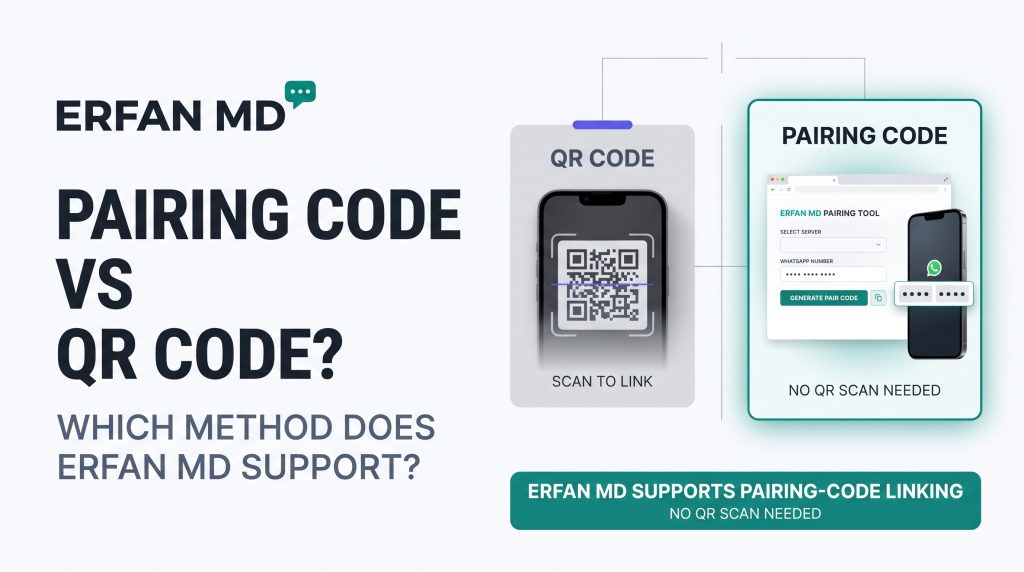
Before starting the pairing process, make sure you are using the intended Erfan MD website. Pair only a WhatsApp account that you own or are authorised to manage. Never share your pairing code or WhatsApp verification codes with another person.
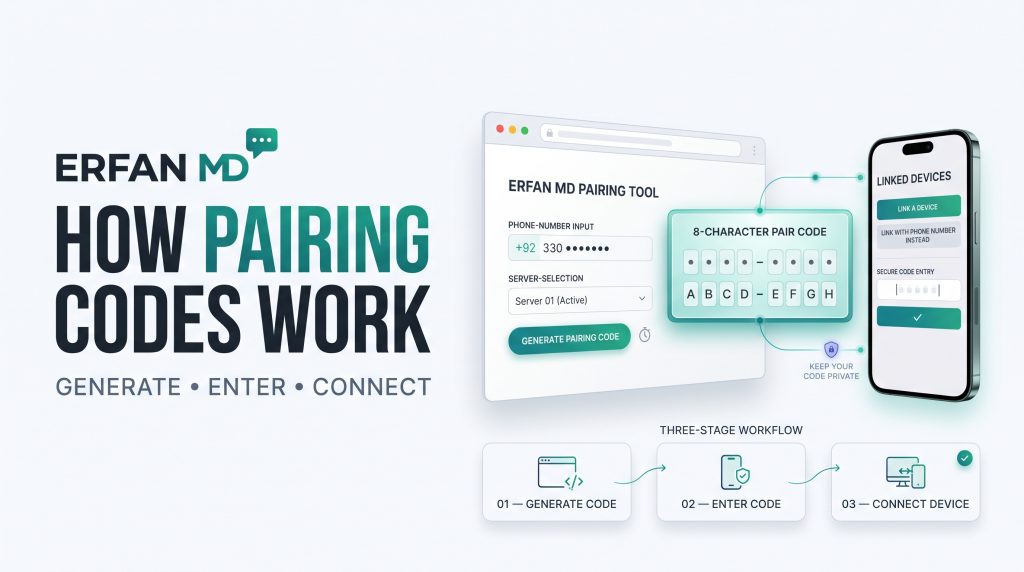
The pairing process uses an eight-character code. Here is the documented process:
- Open the Erfan MD pairing tool and choose a server. The dashboard displays active slots against the limit.
- Enter your WhatsApp number with its country code.
- Tap Generate Pair Code. The tool provides an eight-character code, a cooldown timer and a Copy Code button.
- Open WhatsApp and go to Linked Devices.
- Choose Link a Device, then select Link with phone number instead.
- Enter the pairing code in WhatsApp.
- After linking, read the bot’s connected confirmation message and note the displayed command prefix and mode.
You can then use .menu to view the bot’s command list. For the connection instructions, visit the Erfan MD bot connection guide.
Review the Linked Devices area in WhatsApp regularly. Keep your pairing code private, and use WhatsApp’s own device controls to unlink a session you no longer recognise or want connected.
Do Not Rely on APK Claims or Unrelated Download Links
A search for “mini whatsapp bot free” may lead to pages advertising APK downloads, free bot packages or unrelated applications. The wording of a search result does not establish that a download belongs to Erfan MD.
Do not install an application or provide account information simply because a page uses the Erfan MD name or a similar logo. Start with the project’s website and its pairing instructions. For information about account linking and platform requirements, consult the WhatsApp Help Center.
Common Mistakes When Identifying a WhatsApp Bot
| Mistake | Why it matters | What to do |
|---|---|---|
| Assuming every “Mini Bot” is Erfan MD | A search phrase does not identify the service operator. | Check the website address and the Erfan MD project name. |
| Using an unrelated APK or download page | A similar name does not establish that a file belongs to the project. | Start with the Erfan MD website and its pairing instructions. |
| Entering a number without its country code | The documented pairing instructions require the full number with country code. | Include your country code before generating a pairing code. |
| Sharing a pairing code | The code is part of the account-linking process. | Keep it private and enter it only in the intended WhatsApp linking flow. |
| Assuming “free” from a search result | The search phrase does not establish the service’s pricing. | Do not treat a free-download claim as confirmation of Erfan MD pricing. |
| Confusing the website, pairing tool and bot | They perform separate functions, so a problem with one does not automatically identify an issue with another. | Identify which component you are using before describing a problem. |
What Erfan MD Cannot Guarantee
Erfan MD is an independent project, not an official WhatsApp or Meta service. Account restrictions and bans are decided by WhatsApp or Meta. Erfan MD has no control over those decisions and cannot guarantee a ban-free experience.
Erfan MD has no access to users’ WhatsApp chats or data. It runs a server that the user’s WhatsApp links to. Users should still make their own decisions about which account to connect and should review their linked devices regularly.
Responsible use matters when sending automated messages. Use broadcasting and follow-up features with appropriate recipients, respect people’s communication preferences and follow the applicable WhatsApp terms. You can read the WhatsApp Terms of Service for the platform’s terms.
A search label cannot establish a bot’s technical implementation, pricing or account-related guarantees. Those details should not be assumed from the words “mini WhatsApp bot.”
Frequently Asked Questions
Is a mini WhatsApp bot a technical category or a brand name?
The phrase alone does not establish either one. People may use it as a search description, informal nickname or reference to a particular project. Always check the actual service name and operator before connecting an account.
Is Erfan MD the same as every Mini Bot appearing in search results?
No. Erfan MD is the name of its own independent WhatsApp bot project. Unrelated services can use similar words, so a matching search phrase does not prove that they belong to the same operator.
Is the mini WhatsApp bot free?
The phrase “mini whatsapp bot free” does not confirm Erfan MD’s pricing or free status. Do not assume that a free APK listing or an advertisement describes Erfan MD’s actual service terms.
How can I identify the correct Erfan MD pairing process?
Start from the Erfan MD website and follow its connection guide. The pairing tool lets you select a server, enter your WhatsApp number with its country code and generate an eight-character code for WhatsApp’s Linked Devices process.
Does Erfan MD have access to my WhatsApp chats?
Erfan MD has no access to users’ WhatsApp chats or data. It runs a server that the user’s WhatsApp links to. You should still protect your pairing code and review your linked devices using WhatsApp’s own controls.
Can Erfan MD guarantee that a linked account will never be banned?
No. Account bans and restrictions are decided by WhatsApp or Meta, and Erfan MD cannot control those decisions or promise a ban-free experience. Users should follow the platform’s terms and use automation responsibly.
About This Guide
Written by Erfan Ahmed, founder of Erfan MD.
Last updated: 10 November 2026.
This guide was prepared from Erfan MD’s own pairing dashboard and product documentation.
What Can Change
Bot commands, the bot version and service availability may change over time. These details should be reviewed when the pairing flow or product interface is updated.