Erfan MD WhatsApp Bot: How the Platform Works
Erfan MD is an independent WhatsApp bot project that provides a website, a pairing-code tool and a bot that responds to commands inside WhatsApp. Users start on the website, generate a code for an account they control, link that account through WhatsApp’s Linked Devices feature and then use the bot’s .menu command to view its available features.
What Erfan MD provides
The website, pairing tool and WhatsApp bot have different roles
Erfan MD has three separate parts. Understanding their differences helps users identify where to begin and avoid treating every technical issue as the same problem.
The official Erfan MD website provides information about the project, product features and setup guidance. It is the starting point for someone who wants to understand the service or find instructions.
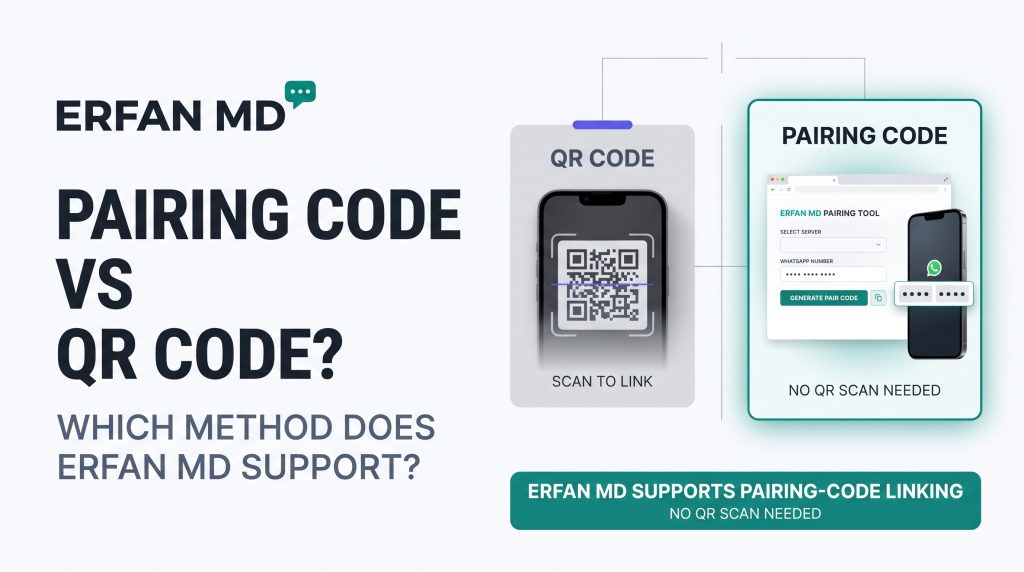
The pairing tool is a website-based utility that generates a code for linking a WhatsApp account. It is responsible for the code-generation stage, not for answering commands inside a WhatsApp conversation.
The Erfan MD bot is the component that responds to supported commands after the account has been linked. Users interact with it through WhatsApp rather than treating the website as the bot’s messaging interface.
| Part | Main purpose | What it does not establish |
|---|---|---|
| Erfan MD website | Project information, product details and setup guidance. | That a WhatsApp account has successfully connected. |
| Pairing tool | Generates the code used to link an account. | That every bot command is available or working. |
| WhatsApp bot | Responds to commands inside WhatsApp after linking. | That the website or pairing tool is responsible for every bot-side issue. |
This separation is useful when something does not work. A page-loading problem, a code-generation problem and a bot-response problem belong to different stages. An issue with one component does not automatically establish that the other two are unavailable.
Who the service is designed for
Erfan MD is intended for people who want to use WhatsApp bot functionality through an account they control. Its documented capabilities include sending broadcast messages to the owner’s contact list, displaying product or service listings inside chats, sharing links to a business’s other social profiles and sending automated follow-up messages.
These functions can be relevant to someone managing business communication or organizing interactions through WhatsApp. However, the existence of a feature does not mean that every command is suitable for every account or communication purpose. Users remain responsible for how they use their accounts and contact lists.
Erfan MD is an independent project. It is not owned, operated, endorsed or certified by WhatsApp or Meta. The Erfan MD name should not be interpreted as an official WhatsApp product or endorsement.
How the user journey works
Start from the official Erfan MD website
Someone searching for a WhatsApp bot online may find several different kinds of services. In Erfan MD’s case, the website is the information and setup entry point. The actual pairing process uses a separate tool, while the bot’s command responses take place inside WhatsApp after linking.
Start with the Erfan MD platform overview to understand the general process. The website’s setup instructions explain how to move from the pairing stage to using the bot. Do not assume that simply visiting the website connects a WhatsApp account.
Move from pairing instructions to the actual bot menu
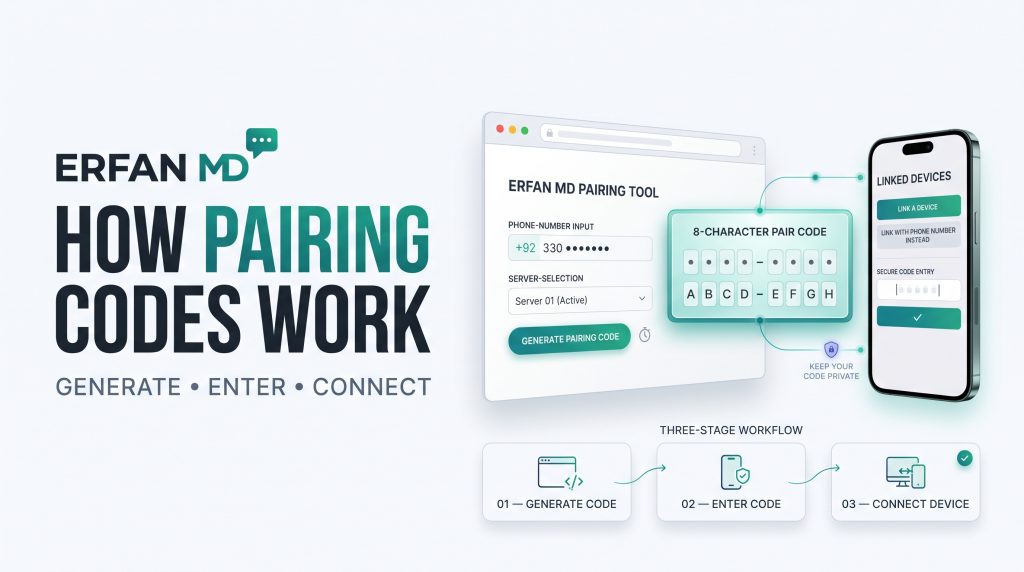
The pairing process uses a code to link the WhatsApp account to the selected server. A pairing code is a temporary code entered through WhatsApp’s phone-number linking option. It is different from a password and should be treated as sensitive account-linking information.
Follow these steps:
- Open the official Erfan MD website and navigate to the pairing tool through its setup instructions.
- Choose a server. The dashboard displays active slots against the applicable limit.
- Enter the WhatsApp number you control, including its country code.
- Select Generate Pair Code. The tool provides an eight-character code, a cooldown timer and a Copy Code button.
- Open WhatsApp on the account you intend to link.
- Navigate to Linked Devices, select Link a Device, then choose Link with phone number instead.
- Enter the pairing code generated by the Erfan MD tool. After a successful connection, the bot sends a confirmation message.
The connection confirmation identifies the command prefix as . and displays the current mode as public. The prefix is the character placed before a command. The .menu command is then used to request the bot’s feature list.
For detailed connection instructions, use the Erfan MD WhatsApp bot setup guide. Keep the website pairing stage separate from the commands you use after the account has connected.
What the command menu contains
Verified capabilities and command areas
After linking, send .menu to request the bot’s feature list. This is the documented entry point for discovering the command options available in a connected session.
The supplied product information confirms several functional areas. They describe what the bot can do, but they should not be mistaken for exact menu headings or a complete command catalogue.
| Documented capability | What it means |
|---|---|
| Broadcast messaging | Sending broadcast messages to the owner’s contact list. |
| Product and service listings | Displaying product or service information within a WhatsApp chat. |
| Social profile links | Sharing links to the business’s other social profiles through replies. |
| Automated follow-ups | Sending follow-up messages automatically. |
| Chatbot commands | Accessing a library of commands through the bot’s command interface. |
The exact category names can differ from these functional descriptions. The table documents confirmed capabilities, not a claim that the menu uses those exact category titles. Users should consult the actual .menu output in their connected session for the available options.
A menu snapshot is not proof that every command is available
A menu is a list of features presented by the bot. It should not be treated as independent proof that every listed command is available in every session or that every feature will produce the same result under all account conditions.
There is also a difference between seeing a command in a menu and understanding its effect. Users should read the relevant command description before using an option that sends messages or shares information with other people. In particular, broadcasting and automated follow-ups should be used responsibly rather than as unsolicited bulk messaging.
For a broader explanation of the documented product capabilities, visit the Erfan MD features page.
Requirements and limitations
Phone, account control and setup requirements
Users need access to the WhatsApp account they intend to link. The number entered into the pairing tool must include its country code, and the person completing the process must be able to navigate the account’s Linked Devices settings and enter the generated pairing code.
This is an account-linking process, not a way to connect someone else’s WhatsApp account without permission. Only link an account that you own or are explicitly authorized to manage. Never give a pairing code to another person, and do not publish it in a message, screenshot or support request.
The connected confirmation also provides useful information about the bot’s operating mode. Public mode means the bot replies to anyone. Private mode means it replies only to the owner. The documented connection message displays public as the mode after linking; users should not assume that their connected session is private.
Service availability and third-party limitations
Erfan MD operates a server that the user’s linked WhatsApp account connects to. According to the project’s supplied privacy information, Erfan MD does not have access to users’ WhatsApp chats or data.
That statement should be understood as the project’s description of its own access. Users should still protect their WhatsApp account, review the devices linked to it and avoid sharing account-linking information. Keeping control of the WhatsApp account remains the user’s responsibility.
WhatsApp and Meta control decisions about account restrictions and bans. Erfan MD cannot make those decisions, reverse them or guarantee that using a bot will be ban-free. No third-party bot should be presented as a guarantee against account enforcement.
The available product information does not establish a particular uptime percentage, maximum server capacity, regional availability, subscription price or free-service status. Users should not rely on assumptions about these matters when deciding whether the platform meets their requirements.
Getting started safely
Use the existing setup guide
Begin with the step-by-step connection guide rather than relying on an old menu screenshot or instructions copied from an unrelated WhatsApp bot. Follow the pairing sequence, use the number you control and enter the generated code through WhatsApp’s phone-number linking option.
Once connected, read the confirmation message and use .menu to discover the bot’s listed features. The website explains the project and pairing process; the bot’s responses are accessed through WhatsApp.
Protect the linked account and know where to get support
Before using the bot, keep these account-security practices in mind:
- Pair only a WhatsApp account you own or are authorized to manage.
- Never share your pairing code or WhatsApp verification information.
- Review the account’s Linked Devices list regularly.
- Unlink a device from WhatsApp’s Linked Devices settings when you no longer recognize or need that connection.
- Read the effect of a command before using features that send messages or share information.
- Use broadcasting and automated follow-ups responsibly, with respect for recipients and applicable WhatsApp rules.
For questions about the project, contact the Erfan MD support team at company@explorefrag.com. Do not include pairing codes, passwords or other sensitive account information in a support message.
Common mistakes to avoid
Several misunderstandings can make the setup process confusing:
- Confusing the website with the bot: The website provides information and pairing access. Bot commands are handled inside WhatsApp after linking.
- Entering the code in the wrong place: Use WhatsApp’s Link with phone number instead option rather than treating the website as the place where bot commands are entered.
- Leaving out the country code: The pairing tool’s number field requires the WhatsApp number with its country code.
- Sharing a pairing code: A code is used to link an account and must not be handed to another person.
- Assuming public mode means private access: Public mode replies to anyone; private mode replies only to the owner.
- Treating the menu as a service guarantee: A listed feature is not a guarantee that every command will be available in every session.
It also helps to identify the stage where a problem occurs. A difficulty opening the website is different from a code-generation issue. A successfully linked account that does not receive the expected bot response is a different situation again. Do not assume that one symptom proves a problem with every part of Erfan MD.
What Erfan MD cannot promise
Erfan MD cannot promise that a WhatsApp account will never be restricted or banned. WhatsApp and Meta make those decisions. The project also does not establish guaranteed uptime, unlimited server capacity, availability in every country or a specific level of service for every user.
It should not be represented as an official WhatsApp or Meta product. The project is independent, and the presence of a pairing tool does not mean that WhatsApp or Meta endorses it.
Finally, a command library does not mean every possible WhatsApp task is supported. The bot’s documented capabilities should be distinguished from features that have not been confirmed. Users should consult the actual connected menu rather than rely on an assumed command list.
Frequently asked questions
What is the Erfan MD WhatsApp bot?
Erfan MD is an independent WhatsApp bot project with a website, a pairing-code tool and a bot that responds to commands inside WhatsApp. Its documented capabilities include broadcasting, product or service listings, social profile links and automated follow-ups.
Is the pairing tool the WhatsApp bot itself?
No. The pairing tool generates a code used to link a WhatsApp account. The bot is the separate component that replies to commands after the account has connected.
How do I connect my WhatsApp account?
Choose a server in the Erfan MD pairing tool, enter your number with its country code and generate the eight-character code. In WhatsApp, open Linked Devices, select Link a Device, choose Link with phone number instead and enter the generated code.
What does public mode mean?
Public mode means the bot replies to anyone, while private mode means it replies only to the owner. The documented connection confirmation displays public mode after linking.
Can Erfan MD read my WhatsApp chats?
The project’s supplied privacy information states that Erfan MD has no access to users’ WhatsApp chats or data and operates a server linked to the user’s WhatsApp account. Users should still protect their account and review their Linked Devices list.
Can Erfan MD guarantee that my WhatsApp account will not be banned?
No. Account bans and restrictions are decided by WhatsApp or Meta, not Erfan MD. The project cannot guarantee a ban-free experience.
What can change
The bot’s command list, software version and service availability are details that can change. This guide describes the capabilities and pairing flow documented for this edition. Check the connected .menu output for the command list presented in your session.
About this guide
Written by: Erfan Ahmed, founder of Erfan MD.
Last updated: 10 November 2026.
Editorial basis: Prepared from Erfan MD product information and documented pairing-flow details. No independent live test or current menu capture is claimed.