
A carousel presents several product or content cards in one message, where supported by the relevant messaging product. It can make comparisons easier, but not every WhatsApp account, API, provider, or message type necessarily supports the same format.
Check whether the feature is actually supported
Before designing a campaign around a carousel, confirm the current official documentation for the product and provider. Check template requirements, eligible message types, supported card elements, approval steps, and limitations. A screenshot from another tool is not proof that your account can send the same format.
Make each card useful on its own
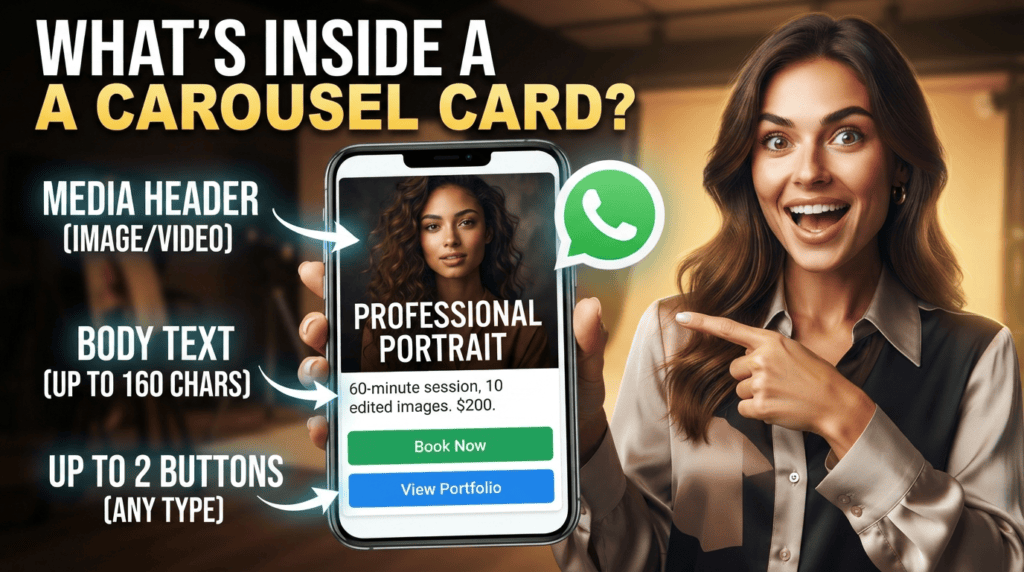
Give each item a clear name, accurate price if displayed, relevant picture, key specification, and a next step. Keep stock and delivery details current. If a card needs a customer to ask about a crucial limitation, improve the card rather than forcing several back-and-forth messages.
Verify format and eligibility first
Before planning a product carousel, confirm the message format is available to the account and integration you use. A visual example on another provider's website does not prove that the format is enabled for your number, market, or API setup. Keep product names, prices, availability, and destinations synchronized with the source of truth. Test on supported devices and include a plain-text alternative for customers who cannot view the presentation.
Prepare a fallback layout
If the card format fails or is unavailable, the customer should still be able to get a basic product name, current price where appropriate, and a working information link. Review image crop, text legibility, tap targets, and how many products are shown without scrolling. A carousel should support a decision, not hide the essential information behind a visual effect. Check the live message on the device types your customers actually use before sending it widely.
A related guide, WhatsApp Channels vs Broadcast Lists: Key Differences, covers a different part of this workflow and helps you plan the next step.
A practical test checklist
- Verify the feature in the provider’s current documentation.
- Create a small test with real product data, not placeholder prices.
- Check how the message appears on different supported devices.
- Track customer questions and correct any ambiguity in the cards.
Example workflow
A clothing seller could compare three available products using size, material, price, and delivery estimates. If sizes are out of stock, the message should say so instead of promoting unavailable items.
Risk checks before launch
Do not claim that a carousel replaces a catalog or is available to every business. Keep a conventional product list or a human response ready when the format is unsupported.
Verify the carousel format in the actual integration
Use this mini-check on an authorized test setup before relying on this workflow. It is a repeatable test plan, not a claim that Erfan MD has already passed these cases.
- Confirm that the exact WhatsApp product, provider, message type, and account are eligible to send carousel content.
- Test card order, images, text length, destination actions, and what a recipient sees on a device that cannot display the format.
- Prepare a text or catalog fallback and confirm that product price, availability, and destination links remain accurate.
Frequently asked questions
Can every third-party bot send carousel messages?
No. Verify the supported feature set, API route, account eligibility, and provider implementation.
What should each card include?
Only accurate and current information that helps a customer decide, plus a clear next step.
Official references and further reading
Feature availability depends on the exact product, connection method, account eligibility, and provider. Verify the workflow on an authorized test setup before relying on it in customer conversations.
Related workflows
- WhatsApp Catalog Best Practices for Small Businesses — Make WhatsApp catalog listings easier to compare with clear names, current prices, useful photos, availability, and ordering instructions.
- WhatsApp Product Listings: Help Customers Choose and Order — Create useful product listings for chat-based buying with clear specifications, option availability, prices, and a safe order-confirmation….